Image Converter
v1.0.0Desktop app to convert images between modern formats, with preview, metadata, and estimated file size after conversion. Built with Electron, Vite, TypeScript, and Sharp.
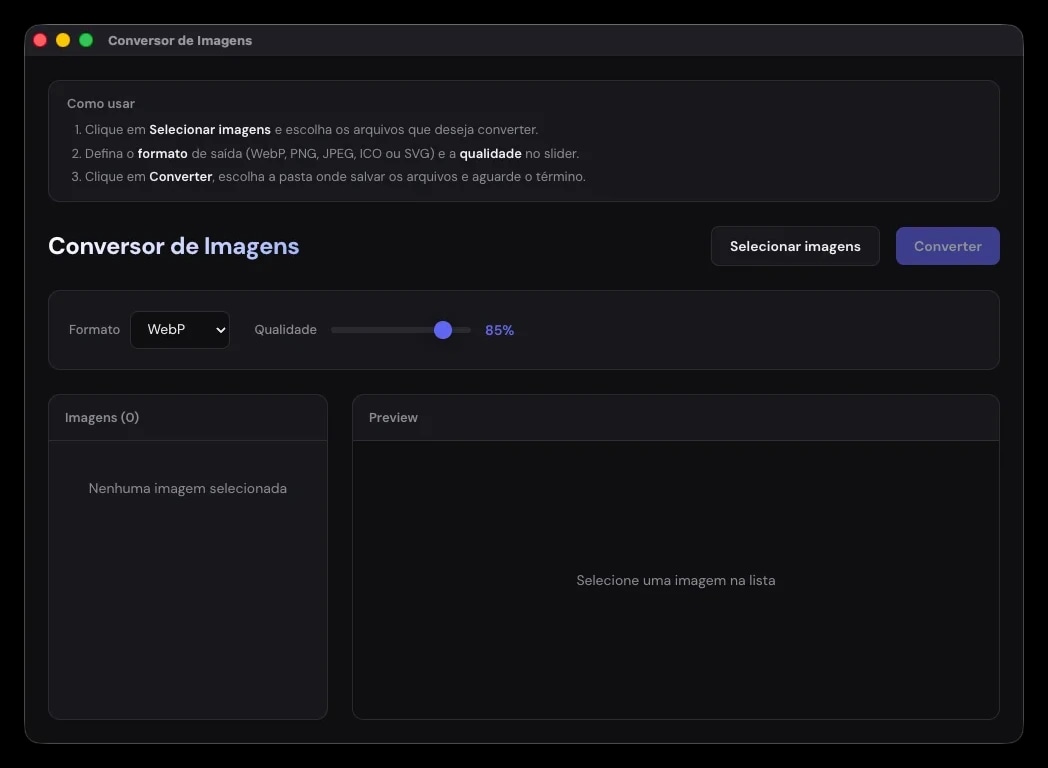
App interface
Desktop layout with batch selection, preview, quality control, and size estimates.
Features
Multiple images
Select several images at once and convert them in batch to the chosen format.
Preview and metadata
Preview the selected image with dimensions, current file size, and post-conversion estimate.
Modern formats
Convert to WebP, PNG, JPEG, ICO, and SVG with quality control from 1 to 100%.
Size estimate
See how much smaller or larger the file will be with the current format and quality, with a progress bar during conversion.
How to use
- 1
Select images
Click Select images, choose one or more files, and see them in the list on the left. Click an item to preview it.
- 2
Check the info
See dimensions, current file size, post-conversion estimate, and how much smaller or larger the file will be.
- 3
Choose format and quality
Pick the output (WebP, PNG, JPEG, ICO, or SVG) and adjust quality from 1 to 100%. The estimate updates automatically.
- 4
Convert and save
Click Convert, choose the destination folder, and watch the progress. Files keep the original name with the new extension.
Supported formats
Input
Output
WebP
Great balance between quality and size for the web.
PNG
Near-lossless; quality controls compression.
JPEG
Ideal for photos; quality heavily affects file size.
ICO
Useful for icons, with multiple internal sizes.
SVG
Generates an SVG with the image embedded as PNG base64.
Quick tips
- WebP ~80–90% — solid default for the web
- JPEG ~75–85% — good balance for photos
- PNG — when you need transparency or less loss
- ICO — app or site icons
- SVG — vector container with an embedded bitmap (tends to get larger)
Build and distribution
The app packages native builds for macOS, Windows, and Linux via Electron Forge, with CI on GitHub Actions.
macOS (arm64)
Produces the .app and a ZIP. On first open, macOS may ask for confirmation under Privacy & Security if the app is not signed.
npm run make:macWindows (x64)
Squirrel installer built on a Windows machine or the windows-latest Actions runner.
npm run make:winLinux (x64)
.deb, .rpm, and portable ZIP artifacts for common distros.
npm run make:linuxGitHub Actions
Pushes to main and v* tags trigger all-platform builds and attach binaries to Artifacts or Releases.